Thursday, June 7, 2012

FAQ's About Document Management


When it comes to Document Management, our clients have asked a lot of questions.  With over 12 years of experience answering them, here are just a few:


Why is document management important?

Today, 80% of all mission-critical data is unstructured, 7.5% of all documents get lost, and 3% of the remainder are misfiled. Organizations are quickly realizing that document management is becoming necessary in order to be more successful. Organizing documents and information through the use of technology ultimately leads to higher productivity, greater efficiency, and improved performance. With an electronic document management system in place, your organization will be able to spend its efforts on the more important and core aspects of your business.

What types of records are being imaged?

It runs the gamut: everything from student and personnel records to board minutes and engineering plans. Many of these records have retention requirements. For others, imaging helps streamline specific business processes.

What are some of the advantages of scanning records, as opposed to just storing them in boxes or filing cabinets?

There are numerous advantages to scanning records. Imaging critical documents results in significant savings in both time and money because information is organized. Once imaged, you can instantly access any record from your desktop computer. This can reduce storage space by as much as 80% or more. Document search time is also greatly expedited.  Requests for documents can be streamlined, completely processed, and printed, faxed, or emailed to the requestor in a matter of seconds.  In addition, organizing imaged documents in a database can help with security, by granting access to only authorized users.

How do I access information after it has been scanned?

Each record type can be setup with key searchable fields, such as date, first name, last name, APN number, etc.  In addition, optical character recognition (OCR) makes electronic documents searchable by every word, so that they can be mined for specific information.

How much does document conversion cost?

Price varies depending on size and volume of the documents. On average, scanning typically costs the same as a photocopy (a standard storage box measuring 10"x12"x16" holds approximately 2,500 pages).

What format is used for scanning files?

The standard format in the industry for scanned files is TIFF. However, records are also commonly scanned as PDF, PDF/A, and JPG, among others.

For more frequently asked questions, check out our website:  http://www.sytechsolutions.com/faq.htm


Friday, February 10, 2012

Case Study: California State Parks, Off Highway Motor Vehicle Recreation Division

The Business Challenge

Parks OHV (Off-Highway Motor Vehicle Recreation Division) needed to better track and understand accident data from multiple state parks, many located in remote locations.  Fulfilling OHV’s public safety role, the initial challenge was to ensure timely and accurate data collection.  Once the data was input, Parks OHV needed an ongoing technology solution that would automatically and accurately extract vital report information and then tabulate the extracted information in easy-to-read, meaningful reports, charts and graphs.  Cost was a major factor.  Like most public agencies, OHV must maximize outcomes despite very severe cut-backs in public sector funding. 


The SyTech Solution

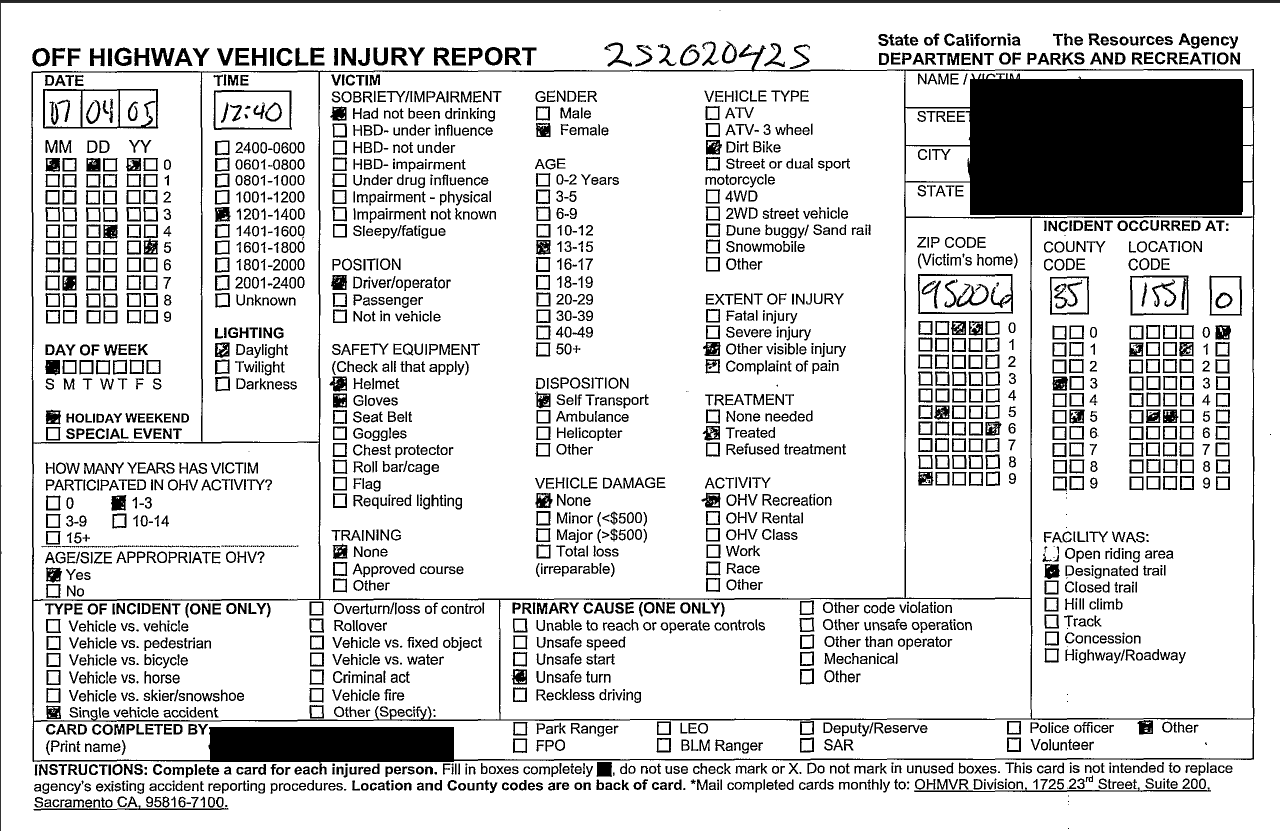
OHMVR partnered with SyTech to help streamline their access to mission-critical data from disparate locations. OHMVR began collecting California State parks data, utilizing "check-box" cards designed by SyTech for scanning. Meanwhile, SyTech quickly set up a Kofax document imaging system and software to accurately image thousands of OHMVR cards per year.

Initially, SyTech scanned approximately 13,000 California State parks cards each year. SyTech captured data from those cards via Kofax Ascent Capture, stored the scanned images in an Alchemy database, imported the captured data into Microsoft Access, and hosted an online query/reporting system to tabulate the data.  SyTech has now developed a more efficient process for gathering information.  Utilizing Android powered Samsung Galaxy 10.1 tablets, SyTech has developed an application for capturing injury information on location.  Key data is input on the tablet and uploaded to 1DocStop, SyTech’s cloud-based solution, built on Microsoft .NET Framework.  This data along with GPS location extracted from the tablet, is stored online for analysis and tracking.     

The online query system provides instant data to OHMVR for effective knowledge management and decision-making. It allows OHMVR users to run reports as needed that include a summary of the data and a visual representation of the data in the form of a pie chart. The system has multiple query options for real-time data collection. Users can specify  parameters to narrow the report to a specific location and time frame. Additional queries can also be written upon request, giving OHMVR unlimited query potential. In     addition, table data can be exported and copied into other applications, such as Microsoft Excel, Word, and Access. The visual representation of the data can also be copied into other Microsoft applications for reporting purposes, and converted into multiple formats (i.e. PDF, BMP, JPG, GIF).

SyTechdrilldown reporting. Users are able to view their data in additional chart types, such as bar graphs and line graphs. Comparison charting allows users to plot a chart with data from one year over a chart with data from another year. Moreover, customizable report formatting allows users to customize the appearance and format of their report.


Statistics Simply Meaningful

OHMVR is reaping many benefits through its collaboration with SyTech. SyTech's technology solution is accomplishing OHMVR's main goals to tabulate vital information and easily access data. Statistical information is available to OHMVR instantaneously via any web browser. This information is made meaningful via the visual charts that are automatically created. These charts can be immediately useful for analysis, presentations, reports, or other uses.


This solution was recognized at Government Mobility 2012 as one of the top 3 "Most Innovative Applications".  Click on the screenshots below for a closer look.

Paper Injury Card


Tablet Interface


Web Interface: Secure Login


Advanced Search


Search Results


Document Viewer


Document Properties


Dashboard - Charts

Dashboard - Charts


Contact Us
For additional information about this or other records and data management needs, please visit www.sytechsolutions.com

Friday, June 10, 2011

Document Management Trends

In today's economy, most organizations are looking to cut costs,  even when it comes to records management.  In the past, that wasn't always the case. 

Many organizations rushed out to buy software packages.  While the software may have had all the bells and whistles everyone thought they needed, it was often proprietary and costly.  Not only was there a sizable price-tag initially, there were annual maintenance fees (at upwards of 20-25% of the initial cost) that often only covered version upgrades.  Licensing was an issue, and more licenses meant more cost.  When support was needed, it was like pulling teeth to get it.  

After all this, not a single page of paper had been scanned.  Organizations had to devote staff and resources to convert a backlog of records that took years to accumulate.  Staff, who already had plenty on their to-do list... and usually much more important tasks. 

Fast forward to today.  The trend is much different.  Organizations are outsourcing scanning and moving away from proprietary, thick applications.  Web-based document management is on the rise and organizations are seeing a better return on their investments.  Costs are much more competitive and support more accessible.  Finally, vendors are seeing the value of on-going partnerships versus one-time software sales.  Does yours?